brillientaKnowledge base

Knowledge base / Intranet Builder / Using the app

Documents, policies & services

  • Everyone reads · Authors publish
  • Workplace package
1 min read · Intranet Builder 2.4.0

Recent documents with category filters and full-text search; approved policies with owners, categories and review dates; read-and-confirm with personal completion status; department profiles; the HR/IT/facilities service catalog; employee ideas with moderation and visible status; offices with local time; and IT's system status board.
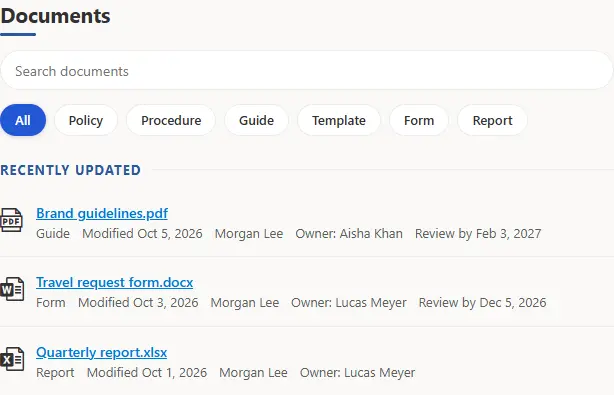
Document center with category filters and recently updated documents with owners and review dates.
Document center. Browse, filter and full-text search over the site's Documents library, with each reader's own permissions. Document actions in the toolbar submit for review or acknowledge policies.
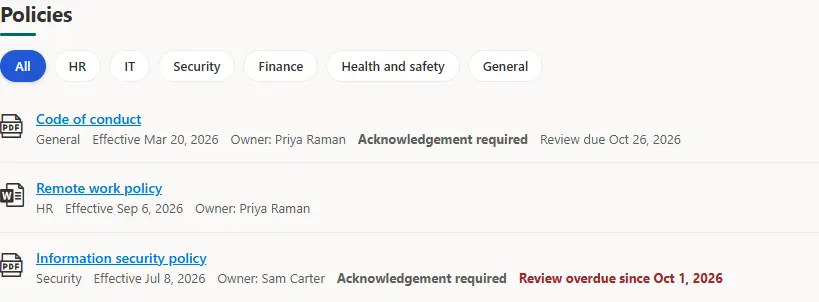
Policy center with category filters and policies showing owner, acknowledgement requirement and review dates.
Policy center. Approved policies with owners, categories and review dates, from the Policies library.
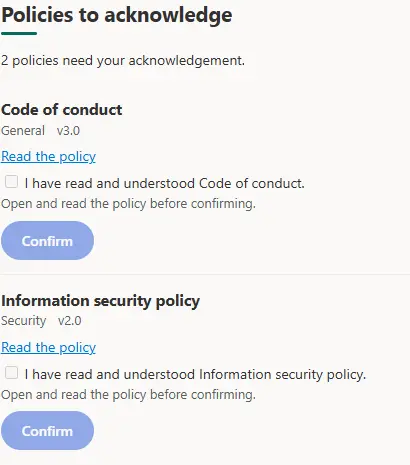
Policy acknowledgements showing two policies awaiting confirmation with Read the policy links and Confirm buttons.
Policy acknowledgements. Read-and-confirm for policies that require it; each person's confirmations stay in a restricted list.
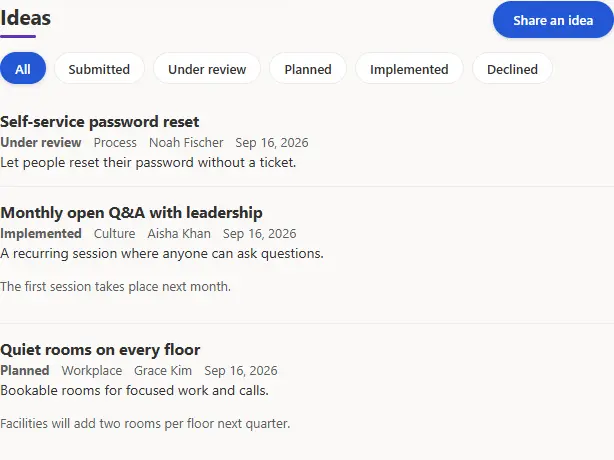
Ideas board with status filters and a Share an idea button.
Feedback and ideas. Employee suggestions with moderation and a visible status from Submitted to Implemented.

How it works

  • Command sets add Submit for review / Acknowledge policy / Request changes to library toolbars and Validate metadata / Request publication to list toolbars.
  • Status columns render as accessible pills through the status field customizer.
  • World clock shows office times with office-hours flags; office locations add addresses, directions and contacts; system status shows operational, degraded, outage and maintenance states.
This article is about Brillienta Intranet Builder.See the productView plansBook a demo
Still need help?Our team answers product questions by email, and we can walk you through it on a call.
Open in the full guideContact support